
I want to take a quick step away from the campaign summaries and talk about the most important tool in my DM prep arsenal, Notion.
I was originally given the idea by Sly Flourish, who made a Notion project template that works with his Lazy DM approach – I found my style of prep is a bit different from his, but the tool itself is fantastic for organizing my scenes, characters, ideas, etc.
Notion itself is a general-purpose collaborative workspace – it’s similar in a lot of ways to some of the corporate project management tools I use at work, like SharePoint or Jira, but with a huge amount of flexibility and features. The general concept of it is that every individual piece within your workspace is a “Page”, and each page has a number of different components to it, both data and metadata. Their standard examples are for managing project tasks, or tracking marketing information and data, and other similar things, but with a bit of creativity it works really well for D&D – either solely for the DM or collaboratively.
Mine is very much in a state of constant evolution as I find what works best and what doesn’t work well for me, but I’ve got it to a place where at very least I’m real proud of it and find that it’s working well.
The heart of my Curse of Strahd Notion workspace is the Campaign Database. Every individual piece of information – the individual Pages – exists in here, categorized with a host of metadata to keep it organized. This is what the full view looks like:

It’s kind of a mess from that perspective, but the real use is the different database views I’ve got set up. Now, Notion doesn’t quite use a typical database – it’s very much a database-like representation of things, which took some time to click with me. Professionally I work with databases all day so I’m used to a lot more granular control and other features, but once this clicked I found it worked real well.
The two most important views of the database I use are the “By Location” view and the “Scenes” view. The first shows me everything organized by where it’s physically located in Barovia, and the second allows for a more chronological approach.
For the Location-centric view, I first started by taking the map of Barovia and dividing it up into regions. They’re not necessarily canon by any stretch, just purely for my own purposes:
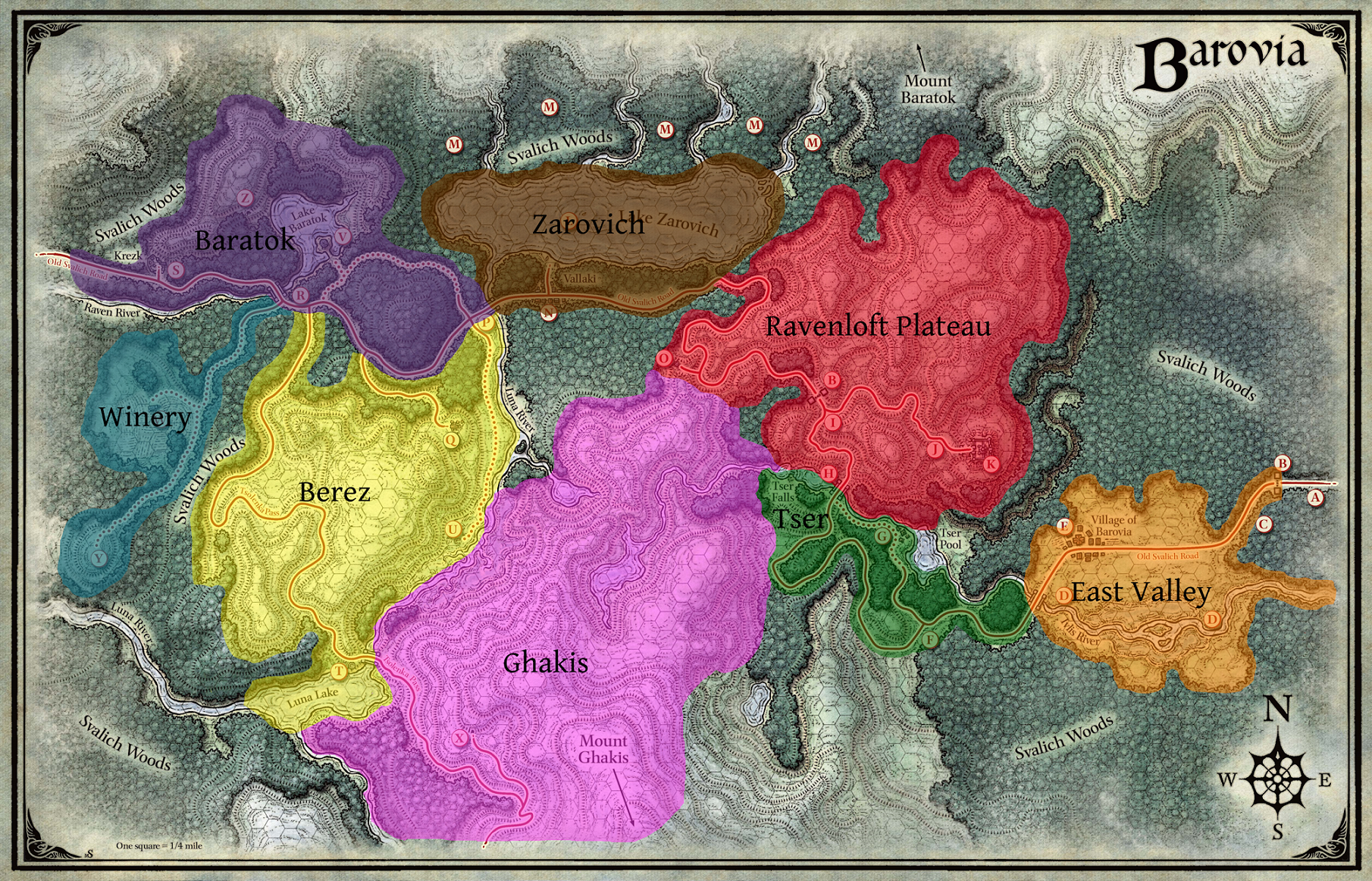
Using that as I starting point I was able to build a view that breaks Barovia down into a nested list of regions, locations, and sublocations with all of the individual scenes, NPCs, and enemies found in each:

At a glance, I can see that there’s three primary locations within the East Valley of Barovia – the east leg of the Old Svalich Road, the Durst Manor, and Little Barovia (the nickname I’ve given the town of Barovia to help out my easily confused players). I’ve got Little Barovia expanded, and I can see a bunch of different pages nested within it – a few Locations, a number of Scenes, and a number of NPCs.
Now, as I mentioned, every distinct piece of data in Notion is the same on a fundamental level – they’re all different pages. What I’ve done is given the different types of pages different tags so I can organize them – and even better, I can assign multiple tags to different pages.
Little Barovia is both a Scene and a Location – it represents a specific physical place in the world, but it also has specific narrative content. The Town Square, however, doesn’t have any specific narrative scene attached to it, so it’s purely a location, and I can tell at a glance that it’s only in there for organization. The little page icon next to each name indicates whether or not that page has any content. Also at a glance I can tell which Sessions involved that item, how much (if any) XP is associated with that scene, and a handy checkbox for whether or not I’ve covered it with my players. From that view I can see that the players received 500XP when they left Barovia, but they didn’t visit Mad Mary at her house or meet Doru.
So this seems all well and good for organizing, but where’s the content, you ask?
Opening up each page – either in the standard “side peek” view I use most often, or in the full view – gets me to the juicy details.
The top half is all the metadata – the different tags, the narrative arc, etc. It’s mostly self-explanatory – “Number” is just a field for ordering the scenes within a session, and not really overly relevant to the Location view.
Below that are the different subitems. I can see all the different pages directly linked to this one, so if I were to open it as a full-page view instead of the side-peek I’d still be able to navigate.

Scrolling down I get to the actual content blocks. Scenes tend to be pretty straightforward, just text that I’m either reading aloud or keeping handy for reference.

NPCs, on the other hand, get a bit more involved.
Here’s the first part of Ireena’s:

It starts off with notes about the character overall – where they were first encountered, physical description, personality, etc.
Past that we start to see one of the other nifty features in Notion; Page Templates. I’ve built an NPC/Enemy Stat Block template that I can just copy and paste all the stats into:

There’s a small table on the side for the ability scores that auto-calculates the modifiers in case I want to tweak something on the fly, and below that I’ve embedded art for the NPC so it’s easily accessible to copy + paste into Discord to show my players. This is the empty template, which I can create with a click when adding a new page:

The other high-level view I use often is the narrative, chronological perspective:

This gives me all the scenes, grouped by the narrative arc, in order that they’re presented to the players – initially it’s the order I plan to present them, and then I go back and revise the numbers in case things happen out-of-order. This was the first arc, covering the party’s entrance to Barovia and their exploits in Death House.
Death House itself, being a more traditional dungeon format, didn’t get the same sort of narrative scene structure that, say, visiting the Burgomeister’s Manor did – it was easier for me to just toss the descriptions of each room into a page for that floor instead of flipping between pages.

When necessary, I can link directly to a page from another for an enemy or an item (although I only bother with creating pages for items with descriptions).

I can just click the link and get taken to the page for the item, and when necessary I can make them externally visible for players – here’s what the players would get for the letter to Mrs. Petrovna.
So far, this all works great for planning and organizing everything at once, but there’s also a system I’ve got in place – and this is the biggest remaining portion of Sly’s template – for organizing individual sessions.

At the top I’ve got my recap blurb that I read at the beginning of the session, then a handy list of the planned scenes that I can check off as I go along. Beside that is any potential XP sources in that session – that’s tied to a second database where I’ve got all the XP values (with a few adjusted in the first Arc to bring them into parity) that keeps track of their overall total.
Below that is a quick reference for relevant locations:

Greyed-out entries aren’t specifically relevant but contain sub-entries that are.
That’s pretty much the bulk of it. The overall scheme is constantly changing, but I’ve got it at a point where I can pretty easily find any information I need. Overall I can’t recommend it enough – while it doesn’t have the D&D-specific features that something like Legend Keeper or World Anvil does, that also means that it doesn’t lock any of those features behind subscriptions or paywalls. It does take some work and ingenuity to make it your own but the flexibility it allows for is fantastic.
Leave a Reply